ChatGPT for B2B Prospecting: Find Decision Makers, Emails and Phones
Ask ChatGPT for the email of a small company's founder: either it declines, or it suggests an address built from the company's website, with no guarantee that it exists. This is not a flaw in ChatGPT, it is a matter of access: it has no verified source of professional contact details. The Listar plugin, published in the official ChatGPT plugins directory, gives it that access. This guide shows how to install it, then how to find a company's decision makers, their email and their phone number, with a real conversation as an example.
Why ChatGPT alone cannot find reliable contact details
A language model does not look things up in a directory. Without a tool, ChatGPT can only rephrase what it read during training or what web search returns. For prospecting, that causes three problems.
- Guessed emails. firstname.lastname@company.com is often plausible, rarely verified. An address that does not exist bounces and hurts the reputation of your sending domain.
- Switchboard numbers. Web search mostly surfaces the switchboard or customer service, not the decision maker's direct line.
- The wrong person. Without the official register, a small company is easily confused with a namesake or with its group holding, and the "director" found is not the right one.
The Listar plugin solves all three: ChatGPT calls Listar, which identifies the company in the official registers, finds its decision makers, then looks up and verifies their contact details. ChatGPT has nothing left to guess.
Install the Listar plugin in ChatGPT
Setup takes two minutes, with no URL to copy and no developer mode. It also works with a free ChatGPT account.
- Open the Listar page. In ChatGPT, open Plugins and search for "Listar", or use the install link on the Listar for ChatGPT page. The page shows sample requests and the plugin's description.
- Install the plugin. Click the install button. ChatGPT shows what the plugin may read from your chats, then offers to connect Listar.
- Connect your Listar account. Sign in to Listar, or create your account with free credit, then allow access. You return to ChatGPT with the plugin active.
- Ask your question. In a chat, click "+", pick Listar, then write your request in plain language.
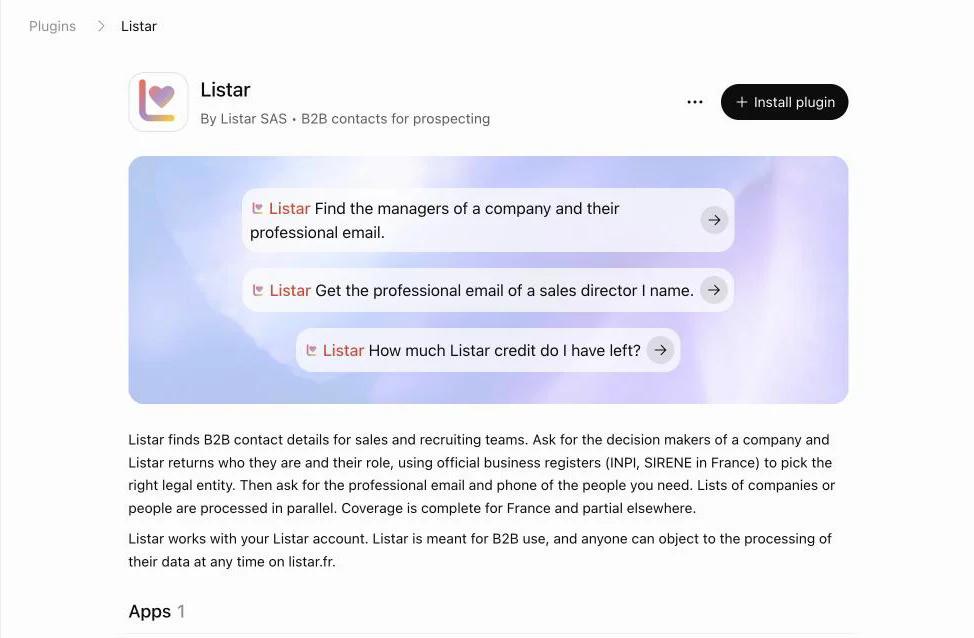
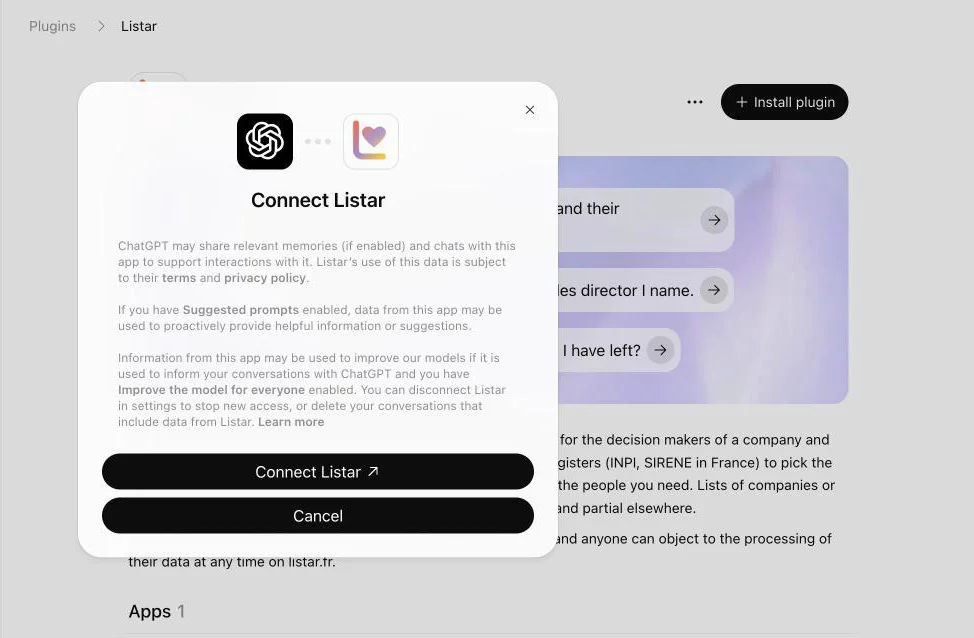
The connection creates a dedicated key, shown in Settings › API keys on Listar. Deleting it cuts ChatGPT's access at once.
All the steps and the list of tools are also on the Listar for ChatGPT page.
Example: find a company's decision makers
For this example, we asked ChatGPT for the directors of our own company, in French. The name and the city are enough: Listar works out the right legal entity.

Listar identifies the company in the official registers (INPI and SIRENE in France), then returns its directors and their roles. ChatGPT lays out the profile: legal name, registered address, SIREN, legal form, activity and website.
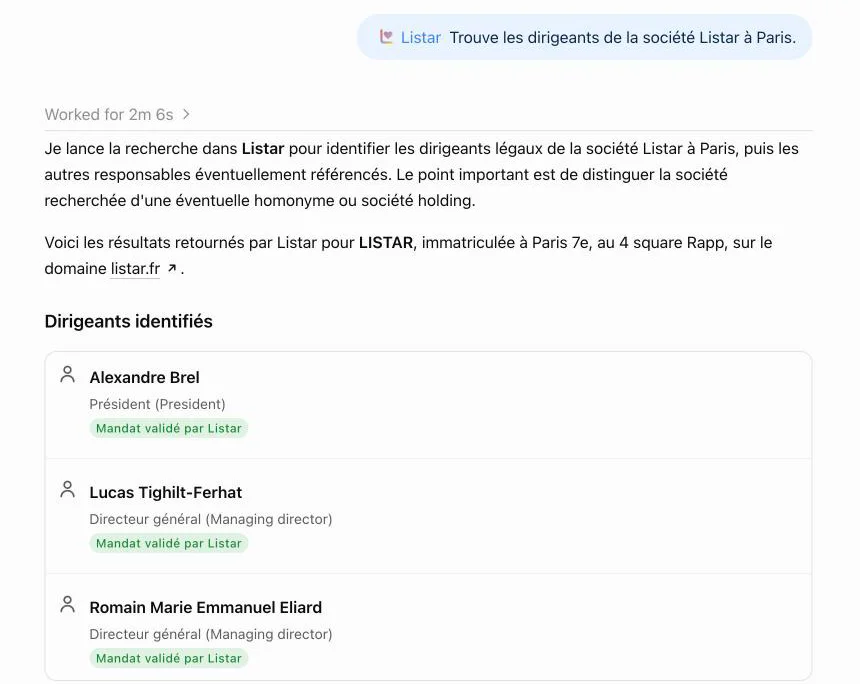
Three details matter for prospecting:
- The mandate is verified. Each legal director comes from the register, which rules out stale profiles and self-declared titles.
- Corporate directors are flagged. When the officer is a holding company, ChatGPT says so instead of making up a name.
- Namesakes are ruled out. When the name matches several companies, or only the holding is known, the result says so. Giving the SIRET or the website of the business removes any doubt.
Beyond the legal directors, you can ask for other roles: "the purchasing managers at…", "the HR director of…". Listar then looks for those roles among the company's employees.
Get a decision maker's email and phone number
Once you have the right person, just ask for their details: "Give me the work email and mobile of [first name last name]". Listar queries several sources in a waterfall, verifies the email and checks that the number belongs to that person before returning it.
Each data point comes with its status: a verified email, a phone number marked work or personal. When nothing reliable is found, Listar says so and bills nothing. ChatGPT does not fill the gap with a made-up address.
A deep search can take one to two minutes. If ChatGPT answers before it ends, ask "Is the result ready?": it picks up where Listar left off.
Enrich a list of companies or contacts
Paste a list in the chat, or describe it, and ask for the same treatment on each row. ChatGPT runs the Listar searches in parallel, then gathers the results.
Here are 10 real estate agencies in Lyon. For each one, find the manager and their work email, then put it all in a table.
The table can be pasted into a spreadsheet or a CRM. For files of several thousand rows, the CSV import of the Listar app is a better fit.
Sample requests that work well
The more precise the request, the faster and more accurate the result. Here are wordings that work:
- Find the directors of the company [name] in [city].
- Who runs the company with SIRET [number]? Give me their work email.
- Find the sales director of [company] and their phone number.
- Here is a list of 20 companies: for each one, find the manager and their email, in a table.
- Prepare my meeting with [company]: activity, directors, and who to contact first.
- How much Listar credit do I have left?
How much does it cost?
The plugin is free. Searches are debited from your Listar organization's credit, at the same prices as the app and the API, with no subscription:
| Company identified | 0.02 € |
| Contact returned (name, role) | 0.05 € |
| Work email found | 0.10 € |
| Phone number found | 0.50 € |
Base prices before volume discounts. A search that finds nothing is not billed. Details are on the pricing page.
Limits and good practice
- Coverage: complete in France, partial elsewhere. For a company outside France, give the country and the website.
- ChatGPT Business and Enterprise workspaces: an admin picks the allowed plugins. If Listar is not enabled, ask them.
- GDPR: B2B prospecting can rely on legitimate interest, as long as you contact people about their job and respect their right to object.
- A wrong result? Tell ChatGPT: the plugin passes the report to Listar so the data gets fixed.
Frequently asked questions
Can ChatGPT find someone's email?
On its own, no: at best it guesses a plausible address without verifying it. With the Listar plugin, ChatGPT gets work emails found and verified by Listar, with their status.
Does the Listar plugin work with free ChatGPT?
Yes. The plugin installs from the directory on a free or paid ChatGPT account. Searches are billed to your Listar credit, not to your ChatGPT plan.
Is Listar an official ChatGPT plugin?
Yes. Listar passed OpenAI's review and is listed in the ChatGPT plugins directory, in the Business & Operations category.
How is it different from ChatGPT's web search?
Web search reads public pages: it mostly finds switchboards and generic addresses. Listar cross-checks the official registers and several contact data sources, then verifies each email and phone number before returning it.
Are my chats shared with Listar?
Listar only receives what ChatGPT sends for each search: the request parameters (name, company, city, etc.) and, if you make one, the text of a report. ChatGPT's own sharing terms are shown when you install the plugin.
In short
ChatGPT is a great prospecting assistant as soon as it has access to reliable data. With the Listar plugin, one chat is enough to identify a company in the register, find its decision makers and get their verified contact details, without leaving ChatGPT or guessing an address.
Using Claude too? The same service plugs into it as an MCP connector: see our Claude MCP guide for B2B prospecting. For manual methods, read how to find anyone's professional email.
Add Listar to ChatGPT in one click.
Install the Listar plugin